You finally got approval to work remotely. Now comes the transition period where you prove this setup can work. Switching to remote work isn’t as simple as just working from your couch instead of a cubicle. If it’s done wrong, you’ll struggle with productivity, isolation, and burnout. Done right, and you’ll join the 71% of remote employees who report greater work-life balance.
Here’s a structured 30-day plan to make your remote work transition successful.
Week 1: Build a Foundation
Day 1-2: Set up an ergonomic workstation
Your kitchen table isn’t a long-term solution. Designate a specific work area, even if it’s just a corner of your bedroom. You need physical separation between “work” and “home.” (Trust me, this will help prevent burnout when you’re tempted to stay on Slack all night.)
If you’re short on space, consider a foldable desk that can be tucked away after hours. (See below.) Essential setup:
- ergonomic chair
- external monitor at eye level
- good lighting (natural light plus a desk lamp)
- reliable internet connection (Test your video setup and fix the lighting and camera on day one, not five minutes before your first remote meeting.)
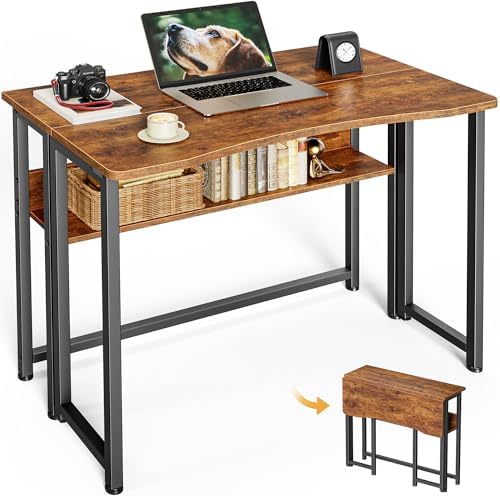
Inexpensive desks like this Huuger Folding Desk (approx. $59) are very compact. High-end models have upscale all-wood designs and hidden monitor mounts.
Day 3-4: Establish a schedule
Remote work flexibility is a trap if you don’t set boundaries. Communicate your core working hours to your team. Keep your schedule updated and available to anyone you work with closely. Block focus time on your calendar for deep work. Treat focus blocks as seriously as client meetings.
Set clear start and end times for work. One in ten remote workers struggle with digital burnout, so create rituals that mark the start and end of your day. Pour a morning coffee before “commuting” to your desk. Take an evening walk after closing your laptop. And log out of work accounts when the day is over!
Day 5: Master your tools
Now that you’ve set up a comfortable remote communication stack, it’s time to get comfortable. Set up proper notifications in Slack or Teams, so you don’t accidentally miss messages. Too many notifications and you’ll be distracted, too few and you’ll miss important updates. Learn keyboard shortcuts for your video conferencing platform. Test screen sharing, virtual backgrounds, and mute functions.
Make sure you’ve downloaded any security software your company requires. Get comfortable logging into systems remotely. Set up any cloud storage or workflow systems so you’re not hunting for files later.
Week 2: Optimize Your Productivity
Day 1-2: Create communication protocols
Learn to over-communicate, and start early. If your team has a daily standup, make sure you attend and speak. If not, let your manager know what you’re working on with a quick message like “Focusing on the Q1 report this morning, available for calls after 2pm.” This prevents the “are they actually working?” anxiety some managers have.
Establish response time expectations. You don’t need to reply to every Slack message in 30 seconds, but define what’s reasonable for your role (emails within 4 hours, urgent messages within 1 hour, etc.). You’ll start to know by the second week what to expect in terms of meetings and messaging.
Day 3-5: Create accountability structures
Track your accomplishments each day, not just your hours. Use a project management tool or daily log to record what you completed. This evidence becomes crucial during performance reviews when you can’t rely on “being visible” in the office.
If you’re on a remote trial period, this tracking is critical to keep your remote designation.
Schedule regular check-ins with your manager and team. Weekly video calls (not just emails) maintain connection and prevent miscommunication. More than 50% of remote workers state they feel disconnected from their team, so over-communicate to prevent that from happening.
Week 3: Strengthen Connections and Habits
Day 1-3: Combat isolation
Remote work can be lonely. Schedule virtual coffee chats with colleagues. Even a 15-minute informal video call can help keep you in the loop. If you have work buddies from the office, take a few minutes each day to talk with them about non-work topics.
Outside of work, join or create a remote worker community using online forums or local co-working spaces. In-person contact is especially important when you work from home. When you eat lunch, take an actual break and leave your workspace. Stay in contact with people!
Day 4-5: Refine your workflow
By now you’ve figured out what’s working and any friction points. Maybe video calls drain you more than expected. If so, schedule buffer time between them. Perhaps you’re working too late every day. In that case, set a shutdown alarm on your laptop.
Three weeks is enough time to figure out how it’s going. Are you getting your work done? Or are you leaving it to the last minute and working late into the night? Experiment with productivity techniques like Pomodoro timers, time-blocking, and playing music vs. silence. Find what actually works for you.

Try a fun Pomadoro timer with different time settings to keep you on track. (Pictured: Printers Jack, approx. $27)
Week 4: Evaluate and Adjust
Day 1-2: Assess yourself
Review your first three weeks honestly. Are you meeting deadlines? Feeling connected to your team? Maintaining work-life balance? Getting enough focused work time?
Identify specific problems with specific solutions. “I feel unproductive” is too vague. “I get distracted by household tasks, so I need to work from a coffee shop two days a week” is actionable. Write down your list of challenges and how to address them.
Remote work can be great, but it also presents challenges to staying focused. You don’t want to risk your job by underperforming or making yourself a target during layoffs.
Day 3: Make strategic changes
Based on your assessment, adjust your setup. Maybe you need better headphones for focus, or a standing desk converter, or a membership to a co-working space for variety.
Communicate what you’ve learned to your manager. If a 9-5 schedule isn’t optimal for your role, propose alternatives backed by your productivity data. If you’re most productive from 10-7, or 6-3, show your data and request a change.
Day 4-5: Plan for long-term success
Remote work is a skill that improves with practice. It’s not about sitting around doing laundry and watching TV all day. Plan quarterly check-ins with yourself to reassess your systems. Put them on your calendar now, so you’ll remember to check in. What works today might not work in three or six months.
Also, build in regular office visits (if hybrid) or team meetups (if fully remote) to maintain relationships. Decide how you want to address meetups going forward. And don’t forget to schedule vacation time. Remote workers often struggle to disconnect.
Your Remote Work Toolkit
By day 30, you should have:
- A dedicated, ergonomic workspace
- Clear boundaries between work and personal time
- Consistent, daily communication with your team
- Productivity tracking that proves your value
- Strategies to combat isolation and maintain focus
- Flexibility to adjust as you learn what works
Remote work isn’t just “working from home.” It’s a different operating system that requires intentional design. Give yourself these 30 days to build a foundation, and you’ll set yourself up for long-term remote work success.
 Work Travel Getaways