After two decades of business travel, I’ve worked from hundreds of hotel rooms from luxury suites to budget chains. Here’s what I’ve learned: the difference between a productive work session and a neck-aching, eye-straining nightmare comes down to having the right gear and knowing how to set it up fast.
Here’s my battle-tested 30-minute hotel room office transformation system.
Why Your Hotel Room Sabotages Productivity
Most hotel rooms are designed for leisure, not work. Makes sense. But if you’re reading this, you know the pain of trying to get things done. That desk? Usually too low. The lighting? Either way too harsh or a dim bedside lamp. The chair? Don’t even get me started. And those “business style” desks often face a wall, cutting you off from natural light.
With six essential items in your carry-on, you can turn any room into a legitimate workspace before your first Zoom call.
The 6-Item Hotel Office Essentials Kit
1. Portable Laptop Stand (The Foundation)
Over the last few years, I’ve noticed a hotel design trend away from desks and toward smaller decorative tables. Good luck with that. A lightweight collapsible laptop stand gets your screen to proper eye level, preventing that forward head lean that causes neck pain.
Look for aluminum stands that fold flat—they add minimal weight but make a massive difference. Position it on a desk, table, or even the dresser if it’s near a window for better lighting.
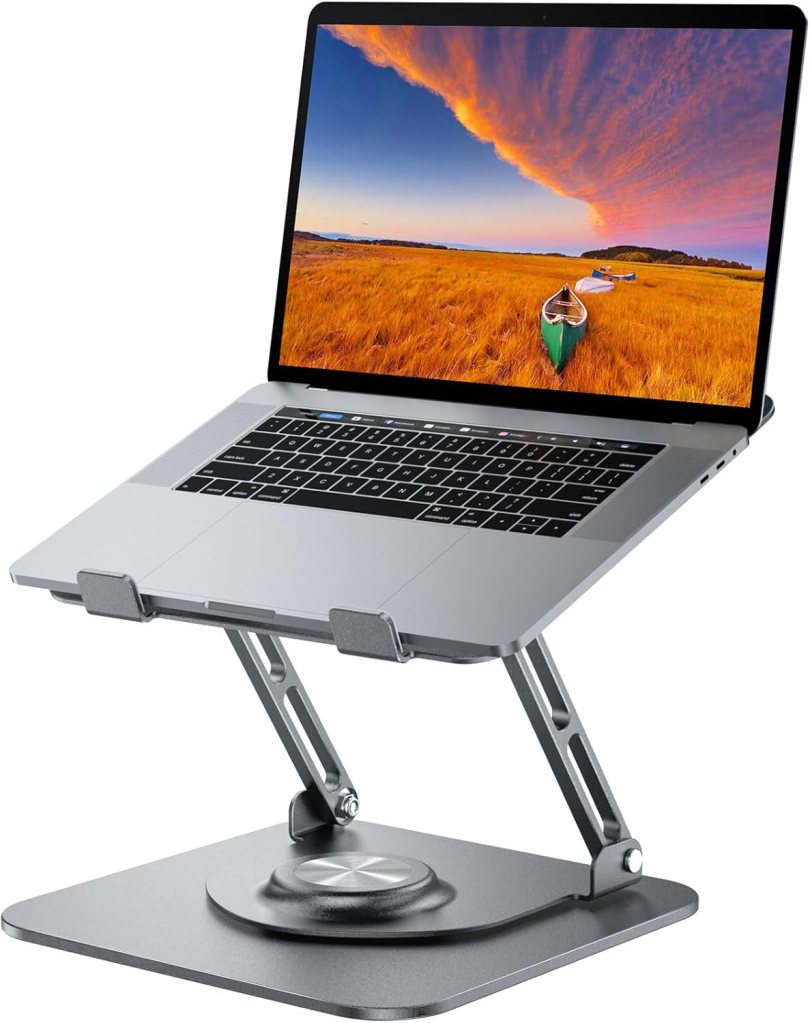
Featured product: Lightweight JOYEKY laptop stand (around $40) fits in a backpack and swivels 360 degrees.
Pro tip: Hotel desks and tables are often too low for comfortable typing. If you’re feeling neck strain even with a laptop stand, try setting up on a tall dresser for a makeshift standing desk.
2. Compact External Keyboard and Mouse
Once your laptop is elevated, having separate input devices gives you better ergonomics. A slim Bluetooth keyboard and mouse lets you maintain proper typing posture without hunching. I prefer models with multi-device switching—you can pair them with your laptop, tablet, and phone without re-pairing every time.
Bluetooth keyboards are inexpensive, so I actually have three different sizes:
- An ultrathin set (less than $10) that tucks into my iPad case for trips where I just want to work with my tablet.
- A lightweight full-size set (around $40) that pops into my laptop bag.
- Lightweight full-size trackpad keyboard (around $40) because sometimes I’d rather use a trackpad and skip the mouse.
What about folding keyboards? This is just my opinion, but I prefer a solid keyboard. I know some people love them, and they pack small if you’re short on space. Keyboards are inexpensive, so try a couple and experiment. Find what you like best!
3. Portable LED Desk Lamp or Ring Light
Hotel lighting is notoriously terrible for video calls and detailed work. You end up looking like a zombie or like you’re calling in from the dark side of the moon. Ring lights are everywhere these days, but they can be annoying to travel with. (Although there are a few travel options.)
A small USB-powered LED lamp gives you adjustable, flicker-free light and makes you look significantly more professional than the “hostage video” lighting most hotel rooms provide. They also fold down and are super lightweight.

Featured product: The Honeywell Portable LED Desk Lamp (around $35) serves a dual purpose: one of the four settings simulates sunlight, which is great for when you don’t get much sun!
4. Noise-Canceling Headphones
We’ve all been in hotels where you hear every clomping step and conversation outside your door. The right headphones are essential for blocking out hallway conversations, housekeeping carts, and the mysterious sounds hotel walls never quite contain. They’re also invaluable on the plane.
If you’re going to be on a lot of calls during your trip, look for a headset with a noise-canceling microphone as well. Look for models with transparency mode so you can hear important announcements without removing them.
5. Portable Monitor (Game-Changer Status)
This might seem excessive until you try it. I fought the idea for years, but once I started traveling with a portable second monitor I never went back. Sometimes I just travel with my tablet, a monitor, and a keyboard. A lightweight 13-15″ USB-C powered portable monitor is almost as thin as an iPad and effectively doubles your screen real estate.
I write for a living, so it was game changing to have a presentation or working document on one screen and notes and messaging on another. Having my notes and Slack visible while working in a document is so much easier than swiping between apps. Most monitors fold into protective cases and fit easily in a laptop sleeve.

Featured product: Ultraslim KYY Portable Monitor with smart cover. Bonus: It also works with phones and gaming devices.
6. Universal Power Strip with USB Ports
True story: I once stayed in a historic hotel that had no USB outlets. Not one. There were only two standard three-prong outlets, and neither one was near the desk. Hotels never have enough outlets in the right places.
A compact outlet strip with USB-A and USB-C ports lets you power your laptop, charge your phone, run your lamp, and top off your headphones all from one wall outlet. They weigh practically nothing, and they’ll save your sanity in rooms where the only outlet is behind a bolted-down nightstand.
The 30-Minute Setup Sequence
Now that you’ve got your gear, here’s how I set up in any new room for maximum awesomeness during the trip:
Minutes 1-5: Survey the space. Identify the best working location (ideally near a window for natural light). Clear the hotel’s promotional materials and unnecessary items from the desk (if there is one). How’s the chair? Do you need a pillow?
Minutes 6-15: Arrange your tech on the desk or table. Laptop stand first, then position your monitor, keyboard, and mouse. You brought your outlet strip, right? If you’re going to be working longer than 20-30 minutes, do your best to make it as ergonomic as possible.
Minutes 16-20: Optimize the lighting. Hopefully you’re near a window and there’s good light. If not, position your lamp to eliminate screen glare. If you’ll be on camera, do a quick test call to check your lighting and background. No zombie attacks, please.
Minutes 21-25: Comfort adjustments. Add a seat cushion, adjust chair height (if possible), test your arm position for typing. Everything should feel neutral—no reaching, no hunching.
Minutes 26-30: Final touches. Make sure everything’s plugged in, connect your headphones, have water nearby, and do a 5-minute test work session to ensure everything feels right. Taking these steps helps prevent mind and body fatigue when you’re working on the road.
The Investment That Pays for Itself
A complete travel ergonomics setup runs $200-$400+ depending on your choices, but consider this: better ergonomics means less back and wrist pain, better focus, and professional video quality (with better client impressions). For frequent travelers, that ROI adds up.
Your hotel room doesn’t have to be a dead zone. With the right gear and approach, you can create a workspace that’s probably better than some of the offices I’ve worked in!
Go forth and transform those generic hotel desks into legitimate command centers! Your neck, eyes, and productivity will thank you.
Affiliate disclaimer: The links in this article are affiliate links. If you purchase a product, the website gets a small commission at no cost to you. It keeps the site running. Thank you for your support!
 Work Travel Getaways